一周多没更新了,最近忙。。。别介意-----介意也没办法。。。
最近网警已介入很火啊,至少我在论坛上看到很火爆,各种语言的版本都出来了。。。。
于是呢。。。 作为一个PHPer ,用网页实现 可以实现全平台(默默地装逼),是不是更有逼格!(此处应有掌声^_^)
先看一下效果: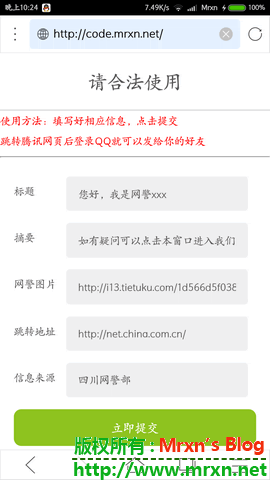

大家可以使用我的这个地址来实现:code.mrxn.net (娱乐而已,一切自负!)
原理剖析:
其实就是利用QQ分享:http://connect.qq.com/intro/sharetoqq/
这个是核心的连接地址(QQ分享):
http://connect.qq.com/widget/shareqq/index.html?url=https://mrxn.net/&desc=&title=这里是Mrxn网络安全中心&summary=这里是Mrxn网络安全中心的介绍&pics=http://i13.tietuku.com/1d566d5f038fd9f7s.jpg&flash=&site=Mrxn网络部&style=201&width=32&height=32
写程序的话,只需要填写这几个字符串信息,然后拼接成url就可以实现了!
我的php源码:
<!doctype html>
<html>
<head>
<meta charset="UTF-8">
<meta name="viewport" content="width=device-width, user-scalable=no, initial-scale=1.0, maximum-scale=1.0, minimum-scale=1.0">
<title>网警介入-网页版</title>
<style>
body,input,button{font:normal 14px "Microsoft Yahei";margin:0;padding:0}
.odform-tit{font-weight:normal;font-size:25px;color:#595757;line-height:40px;text-align:center;border-bottom:1px solid #c9cacb;margin:0;padding:5% 0}
.odform-tit img{height:40px;vertical-align:middle;margin-right:15px}
.odform{padding:5%}
.input-group{margin-bottom:5%;position:relative}
.input-group label{padding:2% 0;position:absolute;color:#595757}
.input-group input{margin-left:5em;padding:3% 5%;box-sizing:border-box;background:#efeff0;border:0;border-radius:5px;color:#595757;width:75%}
.odform button{background:#8ec31f;color:#fff;text-align:center;border:0;border-radius:10px;padding:3%;width:100%;font-size:16px}
.odform .cal{background-image:url(images/daetixian-cal.png);background-repeat:no-repeat;background-position:95% center;background-size:auto 50%}
.odform .xl{background-image:url(images/daetixian-xl.png);background-repeat:no-repeat;background-position:95% center;background-size:auto 20%}
</style>
</head>

<body>
    <h1 class="odform-tit">请合法使用</h1>
<font color=red>使用方法:填写好相应信息,点击提交<br>跳转腾讯网页后登录QQ就可以发给你的好友</font>
<hr>
<div class="odform">
    <form action="login.php" method="post">
        <div class="input-group">
            <label for="wdname">标题</label>
            <input type="text"id="khname" name="title" value="您好,我是网警xxx">
        </div>
        <div class="input-group">
            <label for="khname">摘要</label>
            <input type="text" id="khname" name="summary" value="如有疑问可以点击本窗口进入我们官方网站">
        </div>
        <div class="input-group">
            <label for="khname">网警图片</label>
            <input type="text" id="khname" name="pics" value="http://i13.tietuku.com/1d566d5f038fd9f7s.jpg">
        </div>
             <div class="input-group">
            <label for="khname">跳转地址</label>
            <input type="text" id="khname" name="url" value="http://net.china.com.cn/">
        </div>
        <div class="input-group">
            <label for="khname">信息来源</label>
            <input type="text" id="khname" name="site" value="四川网警部">
        </div>

        <button>立即提交</button>

    </form>
</div>

<div style="text-align:center;margin:50px 0; font:normal 14px/24px 'MicroSoft YaHei';">
<h1>由 Mrxn 提供</h1>
效果如图:<br>
<img src="http://i13.tietuku.com/29eb29343cd0162bs.jpg">
<br><button>
<a href="https://mrxn.net">Mrxn's Blog</a></button>
</div>
</body>
</html>
<!doctype html>
<html>
<head>
<meta charset="UTF-8">
<meta name="viewport" content="width=device-width, user-scalable=no, initial-scale=1.0, maximum-scale=1.0, minimum-scale=1.0">
<title>网警介入-网页版</title></head>
<body><body style="text-align:center">
<?php
$title = $_POST['title'];
$pics = $_POST['pics'];
$site = $_POST['site'];
$url = $_POST['url'];
$summary = $_POST['summary'];
{
echo "您填写的信息为<hr>标题: $title <hr>摘要: $summary<hr>网警图片: $pics<hr>信息来源: $site <hr>跳转网址: $url <br>\n";
echo "<hr><h1><a href=http://connect.qq.com/widget/shareqq/index.html?url=$url&desc=&title=$title&summary=$summary&pics=$pics&flash=&site=$site&style=201&width=32&height=32>马上分享</a></h1>";
}
?>
</body>
</html>
分别是 index.php 和 login.php文件代码 实现起来 so easy 。。。高手默默路过就好! 喜欢的就拿去装逼吧,但是提醒:注意适度,注意安全!
欢迎 转载,但是请注明出处,特别提示那些转载不写出处的,随便吧,说多了没用,自觉!

盗链